Compare Products & Pricing
Choose a size, material, finish, and quantity on the product page to see pricing. Bring your expected order quantities and recurring needs to the setup discussion.
 Warehouse & Fulfillment Solutions
One Label System. Every Aisle, Rack & Shipping Station in Sync. Lock the layout and expose only the fields that should change. For variable-data templates, upload a validated CSV to create unique text, serial numbers, barcodes, or QR codes within one order. Approved finished designs stay ready to reorder.
Already have artwork? Plan around your existing designs and requirements.
Best Fit
Teams is most useful when the approved layout stays consistent but the location, asset, destination, status, or code changes across a larger run or recurring order.
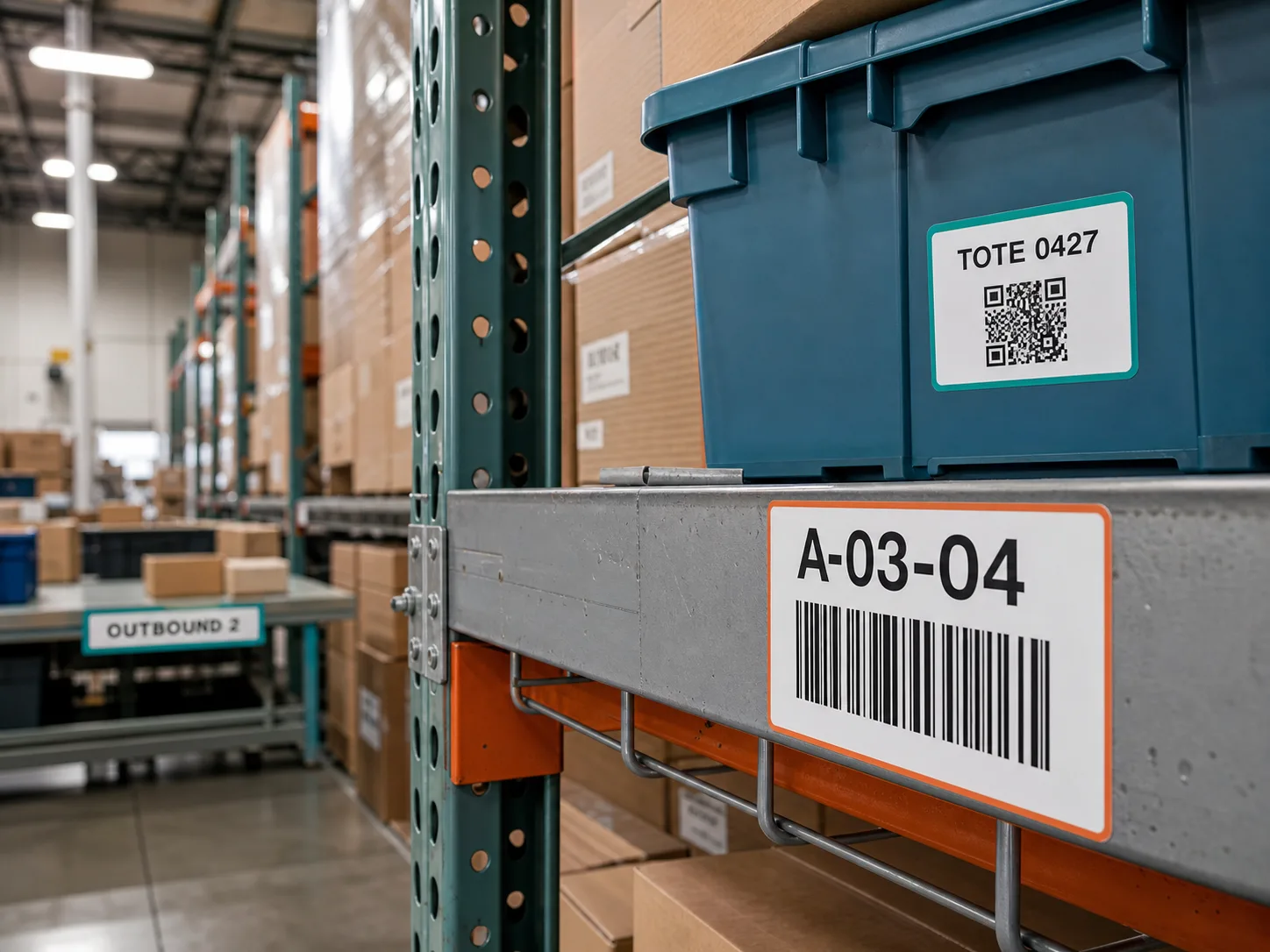
Keep aisle, rack, shelf, bin, pallet, and staging identifiers readable and consistent across the facility.
Use one validated CSV row per variation for text, serial numbers, URLs, barcodes, or QR codes supported by the prepared template.
Standardize visual labels for receiving, inspection, replenishment, returns, staging, packing, and outbound handoffs.
Operations, inventory, shipping, purchasing, finance, and facility managers can each retain the access and approval role they need.
Sticker Invasion for Teams
Prepare the template once, define the fields that may change, then use controlled values or a validated CSV to build the exact label run your operation needs.
Keep approved location, asset, tote, equipment, workflow, and procedure label designs together with the organization.
Protect the approved size, hierarchy, colors, code placement, and fixed copy while exposing only the intended fields.
Enter one controlled value set or upload validated CSV rows for unique location codes, serials, URLs, barcodes, or QR codes.
Single customized bulk orders receive a proof before production. CSV variable-data orders move ahead without a proof. Authorized staff can reorder finished designs with purchasing and funding controls intact.
Qualify the First Label Run
Start with representative labels from one facility. Confirm the material and the printed result in the environment where staff will actually use them.
Illustrative text-field example. Your prepared template supplies the exact CSV headers and supported fields.
| location | asset_id | Printed Text |
|---|---|---|
| A-03-04 | 000427 | A-03-04 / 000427 |
| A-03-05 | 000428 | A-03-05 / 000428 |
| A-03-06 | 000429 | A-03-06 / 000429 |
The system checks template headers, row count, and field values. You verify identifiers, leading zeros, duplicates, code types, and destinations against your source system. File validation does not establish physical scan performance.
Before Your First Order
Teams is your organization's workspace for buying printed stickers and labels from Sticker Invasion. There is no platform or subscription fee. Product orders, shipping, and applicable taxes are paid separately.
Choose a size, material, finish, and quantity on the product page to see pricing. Bring your expected order quantities and recurring needs to the setup discussion.
Explore sticker materials and finishes with a sample pack. For packaging, cold storage, scanners, or demanding surfaces, tell us the application so we can discuss suitable options and a representative test order.
Share your delivery date, destinations, proofing needs, and vendor-onboarding requirements. Plan time for artwork approval, production, and shipping. Invoice terms require separate eligibility and approval.
A launch configured by Sticker Invasion may require an opening prepaid order balance based on the setup involved. The full balance applies to future product orders. We confirm any required balance, scope, and expected launch timing before configuration begins.
Your Warehouse Label Plan
Share what must be identified, scanned, routed, or reordered. We will use that to recommend a focused first template set instead of forcing every facility, workflow, and label type into the first launch.
An Easy First Step
Customize a warehouse-ready design with one location code, asset ID, or workflow status, see your price, and place a single customized bulk order. You will receive a proof showing your customization before that order moves into production. No Teams setup is required. If you later need variable data or controlled ordering across facilities, you will already have an approved design and a proven starting point.
Customize this design before adding it to your cart.
Customize this design before adding it to your cart.
See how Teams supports controlled template fields, CSV-driven variations, scoped access, purchasing approval, and reporting.
Before the First Label Run
No. Sticker Invasion produces physical stickers and labels that can support your inventory control, receiving, picking, staging, shipping, and asset-identification workflows. Your WMS, inventory system, scanner configuration, and operating procedures remain the source of truth.
Yes, when barcode or QR fields are built into a variable-data template. Use one validated CSV row per variation. CSV variable-data orders do not receive proofs, so you remain responsible for the source data, code type, and destination, and a representative scan test is a smart step before a larger run.
No. Single customized bulk orders receive a proof showing the customization before production. CSV variable-data orders do not receive a proof and move into production from the submitted file, so verify every row and use a representative scan test before placing a larger CSV order.
No. Carrier postage labels and tracking data should continue to come from your shipping software or carrier. Sticker Invasion can produce durable workflow labels for receiving, staging, packing stations, routing, returns, and outbound areas.
Yes. Teams is designed around organization-owned artwork and approved versions. Prepared templates can lock your hierarchy, colors, fixed copy, and code placement while exposing only the fields intended to change.
Tell us the surface, temperature, moisture, cleaning, abrasion, expected life, and whether removal matters. We can help compare available product and material options, but a representative adhesion, wear, and scan test is important for specialized, cold, or high-wear applications.
No. Sticker Invasion can print customer-approved artwork, but your organization is responsible for determining the required wording, symbols, colors, placement, material, and regulatory review for any safety, hazard, chemical, transportation, or other controlled label.
We will review the facilities, workflows, data, label types, roles, and ordering path you share. Our email reply will recommend a focused first rollout, identify the inputs needed, and explain the next step. If guided configuration is appropriate, we will confirm its scope and expected timing before setup begins.
One Clear Next Step